

Need to save Thunderbird emails as PDF files? Whether you’re archiving important messages, sharing emails with colleagues, or creating a paper trail for legal purposes, this guide covers three proven methods — from a quick manual export to a batch conversion tool for large mailboxes.
We are well known for the profits of printing data, and it is even beneficial for the users to create a hard copy of data stored in their devices in digital form. It secures the data and keeps it away from all the issues like corruption, technical problems, and many more. It takes some effort to print any vital data and afterward make modifications to it so that it comes out more enhanced. Therefore, before proceeding further in the entire article, we will be discussing the ways that can be employed to batch convert Thunderbird email to PDF in a prudent manner.
Hence, the article will provide the entire process to store Thunderbird emails to PDF in an easier way. By knowing all the benefits of the process, you would like to convert Thunderbird to PDF along with all the attachments. But, before proceeding further, let’s switch to the Facts and Advantages that PDF offers. Before discussing things further, let’s know briefly about PDF files.
Benefits of Converting Thunderbird Emails to PDF File
PDF is referred to as a Portable Document File and is completely robust and versatile, especially when it is compared to Thunderbird data files. The PDF files are best suited and provide a lot of benefits, due to which the users want to export Thunderbird to PDF. Some of the uses are listed below:
- Open anywhere, no email client needed. Once saved as a PDF, your Thunderbird email can be opened on any device — Windows, Mac, Android, iPhone — without needing Thunderbird installed. This makes sharing emails with clients or colleagues straightforward, even if they use a different email platform entirely.
- Formatting stays intact, always: PDF locks in your email’s layout — fonts, spacing, inline images, and signatures — exactly as they appeared in Thunderbird. Whether someone opens it on a phone, prints it, or views it five years from now, it will look the same.
- Better for printing and physical records: When you need a hard copy of an email — for a meeting, a client file, or a compliance record — PDF prints cleanly every time. The layout you see on screen is exactly what comes out of the printer, without broken formatting or missing images.
- Reliable for legal and compliance purposes: Emails saved as PDFs are widely accepted as documentary evidence in legal proceedings and audits. PDF is a standardized, tamper-evident format, which makes it far more suitable for formal record-keeping than raw Thunderbird MBOX or EML files.
- Easier to archive and organize long-term: PDF files don’t depend on any email client to remain readable. If you switch email software five years from now, your archived PDFs will open just fine. MBOX files, by contrast, may require specific tools to access.
- Safe to share without exposing your mailbox: When you need to share a specific email thread with someone — a lawyer, an accountant, a manager — sending a PDF is much cleaner and safer than exporting raw email files or forwarding a chain. The recipient gets exactly what they need, nothing more.
- Attachments can be bundled together: Using the right tool, you can export an email and its attachments as a single, self-contained PDF. This keeps everything together in one file rather than scattered across separate downloads.
- Protection against data loss: Thunderbird stores email in MBOX files that can get corrupted if the application crashes or the profile folder is accidentally deleted. A PDF copy of important emails gives you a clean, independent backup that doesn’t rely on Thunderbird’s file structure. Know all the steps to convert MBOX files to PDF.
Methods to Export Thunderbird Emails to PDF Format
Thunderbird is a capable email client, but it has one notable gap — there is no built-in option to directly export emails as PDF files. You can save messages in EML format without any trouble, but PDF is a different story. That said, it is entirely possible to get your Thunderbird emails into PDF, and the process is simpler than most people expect.
Whether you need to save a single important email or export an entire mailbox folder, there are reliable ways to do it. Below, we cover the free manual method first, followed by a dedicated software solution for anyone dealing with large volumes or needing a faster, more automated approach.
Let’s get started.
Free Convert Thunderbird Email to PDF Manually
Quick way to export Thunderbird email to PDF format. But it will be helpful for selected emails. It is not recommended to follow this guide for bulk emails.
- Launch Thunderbird and select the email (Select only one email message at a time) that you want to save as a PDF file.
- Right-click on the selected email and click on Print.
- A dialogue box will appear. Choose the destination, Save to PDF, and hit the Save button.
- Now browse to the path to save the output PDF file.
For Old Extension Users
Step-1. First of all, download the ImportExportTools add-on from its official website, and afterward, launch the Thunderbird mailing client on your machine
Step-2. Open Tools and choose Add-ons to continue the entire process

Note: If you have launched the Thunderbird application, in case the Tools option does not appear on the screen, tap the Alt button on the keyboard.
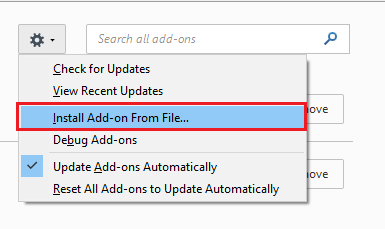
Step-3. In the Add-ons Manager tab, hit the Settings option and select the Install Add-On From File function
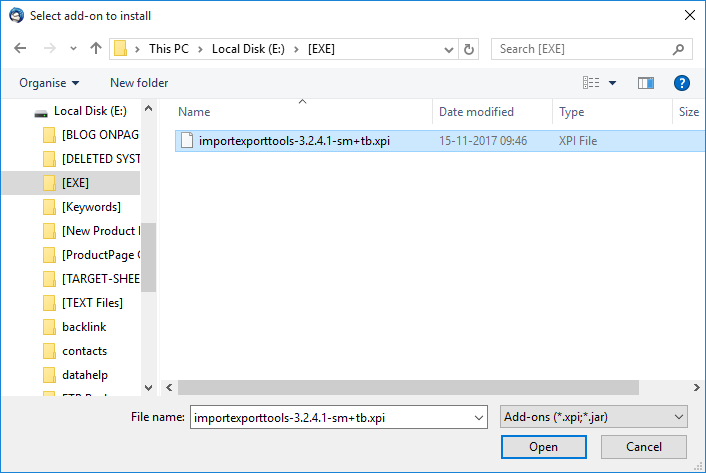
Step-4. Browse the location where you have downloaded the Import/Export Add-on, and select and click the Open button
Step-5. It enables a Software Installation window, from where you need to click on the Install Now option. The Import/Export add-on will be installed in Thunderbird.
How to Open Google Takeout MBOX File?
Step-6. Select the Restart Now alternative to install the Import/Export Add-on in your Thunderbird program
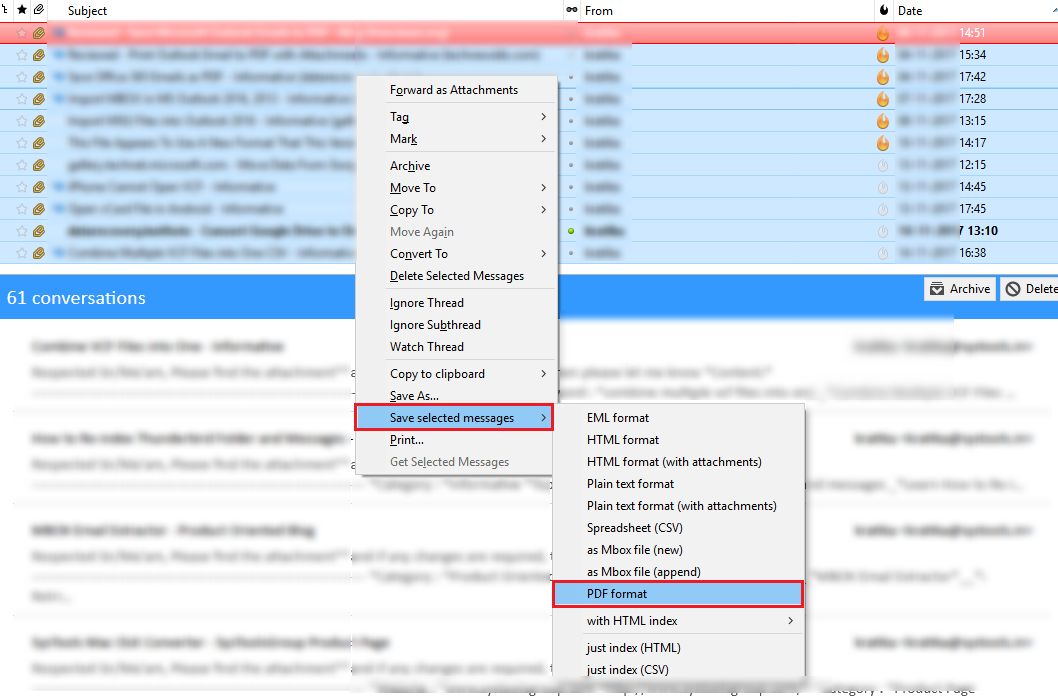
STep-7. Choose the mails that you need to convert from Thunderbird to PDF, afterward right-click on it and initiate the process
Step-8. Opt for Save selected messages >> PDF Format option, from the list of alternatives previewed on the display screen
Step-9. Click OK and then again press OK, to terminate the warning display box displayed on the screen of your system
Step-10. Navigate to the location in which you want to store the PDF files, and then click the Select Folder button
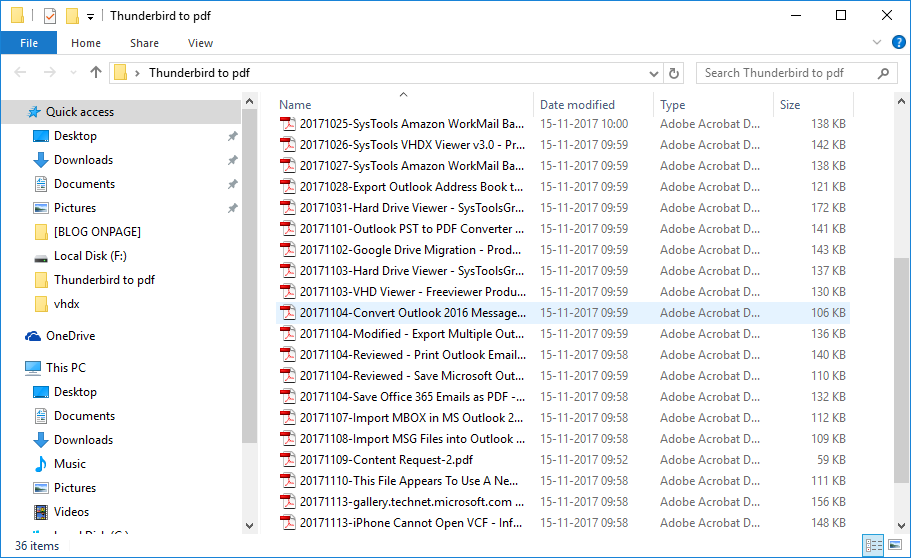
Step-11. Finally, go to the location in which the resultant PDF files are stored. In this case, you will have all the selected emails from Thunderbird to PDF, without errors and omissions.
Paid Software to Save Thunderbird Email as PDF Format
SysTools has developed an advanced software that allows Windows and Mac OS users to export Thunderbird emails to PDF format. It ensures the export of complete data without changing font size, font family, hyperlinks, inline images, signatures, contact details, email header, and attachment management.
You just need to perform certain steps to convert Thunderbird email to PDF format and save it locally.


