

Hard drives usually show warning signs before they fail but most people notice them too late and the same case if I compare this with SSD well it generally does not give any warning signs and it silently fails. Now the right free hard drive health check software should be fully capable enough to read your drive’s SMART data, shows you its temperature and also flags errors where your files are still safe. In this guide we will discuss the top 7 free tools, compare them all, explain which one suits your HDD or external drive and also you will learn what to do if the result is bad.
Quick Comparison of Free Hard Drive Health Check Software
You can check below the table as this table will help you to understand which software is best, why it is best and their use types with level of difficulty. And also it will help you in quick comparison before deciding which software is to Download and use.
| Tool | Best for | HDD | SSD | Test type | Difficulty |
|---|---|---|---|---|---|
| CrystalDiskInfo | Beginners and daily monitoring | Yes | Yes | SMART status only | Easy |
| HDDScan | It is slow or old HDDs | Yes | Partial | Read and verify tests | Medium |
| SeaTools | For HDD diagnostics | Yes | Yes | Short and long tests | Easy |
| GSmartControl | Detailed SMART reports | Yes | Yes | SMART self tests | Medium |
| DiskGenius Free | Verification of bad sectors | Yes | Yes | Verify scan | Easy |
| PassMark DiskCheckup | Basic health and diagnostics | Yes | Yes | Investigation | Medium |
| smartmontools | For advanced users | Yes | Yes | SMART self tests | Hard |
How to Choose These Free Hard Drive Health Check Tools?
Not every free hard drive health check software is safe or accurate so I advise you to choose wisely. There are many websites who push fake “disk cleaners” that are really adware. So we only picked tools that are free and best for home use, come from an official developer, read SMART data, run on Windows 11 and 10 and all other versions also they do not change your data by default. Paid tools are not included in this and it is left out.
Important: Do you want to check the health of the SSD? Find out How to Check SSD Health Using 5 Free Tools in Windows 11 and 10 and understand the health results.
7 Best and Free Hard Drive Health Check and Diagnostic Software
The following tools offer users complete different ways to check hard drive health. Some of them are better for beginners where others provide advanced diagnostic options and also hard drive health check software free download is tried and tested on windows 11 and 10 operating systems. So let’s now explore the functions of all seven tools and see how to use them properly and simply understand What is the best free software for checking hard disk health.
1. CrystalDiskInfo – Best for Beginners
If you are a beginner and thinking “Is there a way to check the health of my hard drive?” then I would recommend you to use CrystalDiskInfo. This is the simplest hard drive health checker software for Windows. By installing this software you will get a clear status (Good, Caution or Bad), temperature, power-on hours and SMART values on one screen. It also supports SATA, NVMe and many USB drives and it can send alerts in the background which is the best part of this tool.
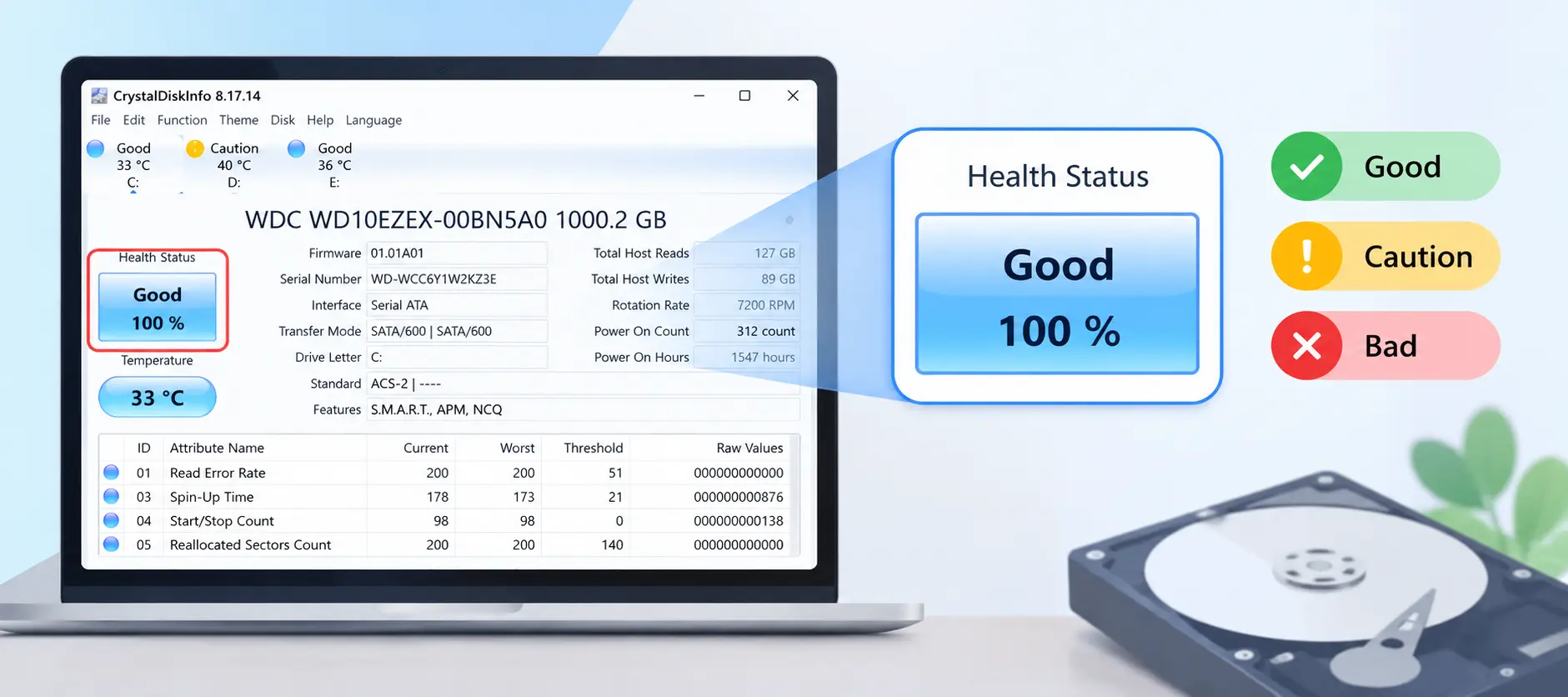
- Limit: This Free Hard Drive Health Check Software is not able to scan the surface of the disk. Health percentages for SSDs and also it differs between brands.
- Quick start: You can visit the official website and install the software, next you need to open the app then select your drive and read the status badge carefully.
2. Seagate SeaTools
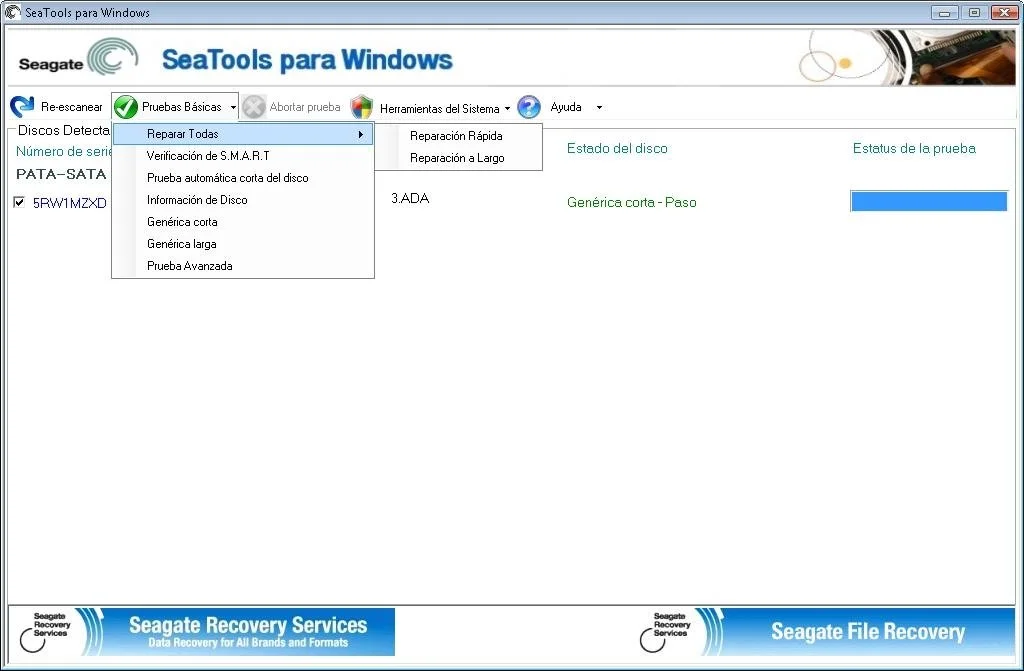
This Free Hard Drive Health Check Software is best if you are running diagnostic tests on supported hard drives.
SeaTools is a free diagnostic utility from Seagate. By using this tool you can run short and extended tests which allow you to check whether a supported drive reports hardware related problems. It is very useful when your hard drive shows errors, behaves unusually or you need a more detailed check than use its basic SMART status reading.
3. HDDScan – Best for Slow or Old Hard Drives
If you are wondering about hard disk health check software free download for PC then you can continue with HDDScan as this is a portable HDD health check tool that comes with read and verify tests. Using this tool one can easily measure how fast each block responds so it can reveal all the weak areas on a spinning disk. It also shows SMART data.
4. GSmartControl – Best for Detailed SMART Reports
GSmartControl is the best Free Hard Drive Health Check Software if you are looking for detailed SMART reports. You can see every SMART attribute like error log and tool supports self-tests without typing any commands.
Points to Remember: It is open source and some USB adapters do not pass SMART commands therefore in the case of external drives the results might be empty.
5. DiskGenius Free Edition
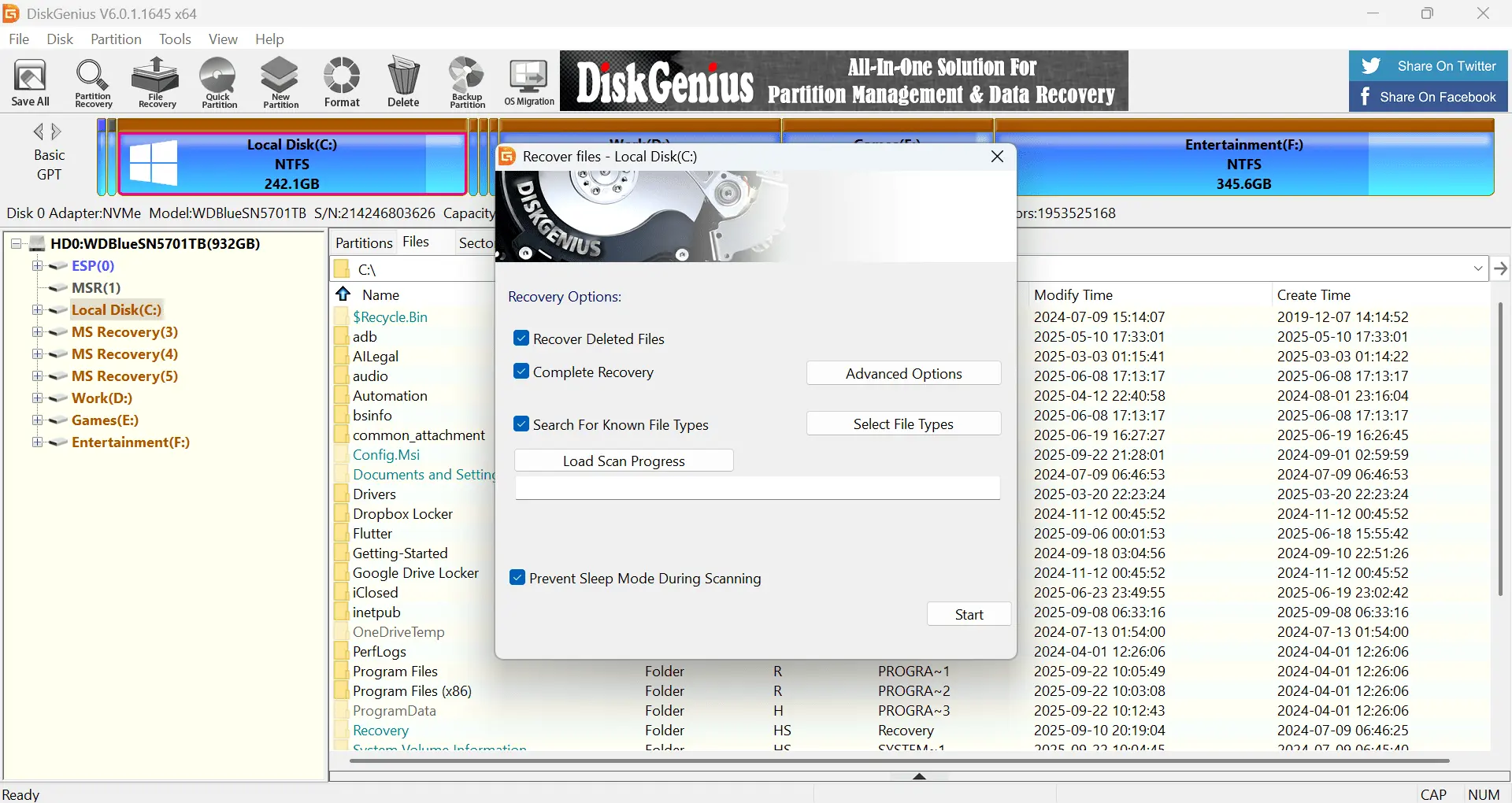
If you are still thinking, what is the best tool for checking hard drive health and all in one option then DiskGenius Free Edition is best for you as it shows SMART details such as health status, power-on hours and remaining life. You will get the Verify option to scan hard disk for bad sectors. It also manages partitions and is very handy when you want to look at the layout too.
6. PassMark DiskCheckup
If you want to check S.M.A.R.T. attributes and supported drive self-tests then this Free hard drive health tool is the best choice for you.
DiskCheckup is a Windows utility that reads SMART attributes and provides you complete access to supported disk self-test routines. It can also help users to quickly review drive information and run available tests. It is quite useful if you want to check your driver’s reported condition and want to look for signs that need further investigation.
7. smartmontools Best for Advanced Users
In search of Free Hard Drive Health Check Software this smartmontools is a free command line SMART tool. It gives you the full raw report and software supports scheduled checks through its smartd service. So if you are an advanced user only then you should use this tool else for beginners they can start with CrystalDiskInfo instead.
Which Hard Drive Health Checker Should Choose?
Now it’s time for the final verdict as many of you may still think that which is Best Hard Drive Health Checker Software and how do I check my PC hard disk health?
- First time user: So if you are a beginner you can start with CrystalDiskInfo.
- Old HDD with slow file access: If you have old HDD and it is slow so use HDDScan then SeaTools.
- Need bad sector check and partition view: In this case DiskGenius Free tool is best.
- IT technician: If you are a tech guy then go with GSmartControl or smartmontools
For most of the people only one free hard drive health check software is enough. In some cases users can use a second tool only when the first one shows a warning.
Is Free Hard Drive Health Check Software Safe?
Yes. Most of them are safe if you download it from the developer’s official website. You must avoid mirror sites and “download manager” pages because they generally add unwanted programs. The work of health tools is to mainly read data from the drive so they are low risk.
How to Read HDD Health Results
This table will guide you and to read hard disk drive results and you will understand S.M.A.R.T values what their meaning is and when to concern.
| SMART Value | What it Means | Concern When |
|---|---|---|
| Reallocated Sector Count | A bad sector is replaced by spare ones | Value is above 0 and rising |
| Current Pending Sector Count | sectors that are yet to be re-examined | Any rising value |
| Offline Uncorrectable Sector Count | Sectors that could not be read | Above 0 |
| Temperature | Heat level of the drive | Stays high in normal use |
What Free Tools Cannot Do?
You might be surprised to know that even the best free hard drive health check software only identifies problems and it cannot repair any faulty drive nor can it recover deleted or lost files. Furthermore a “Good” result does not guarantee you that everything is perfectly safe as controller or electronic failures can occur any time. Therefore I always advise everyone to keep a backup of all their important data.
What to Do If Your Hard Drive Health Is Bad
- Back up first: You must copy all your important files to another drive or cloud storage.
- Stop heavy scans: Quickly stop scanning your drive again and again as long surface tests will put extra stress on your weak drive.
- Check cables and ports: Check for bad SATA or USB cable.
- Save the report: You should keep a screenshot of the SMART data for warranty or support.
- Replace your drive if errors keep rising.
Recover Data from a Failing Hard Drive
Warning signs from the hard drive sometimes come too late and as a result your important files go missing, in this case your drive shows as RAW or it asks you to format it. Well it is important to know that deleted files generally stay on your disk until you write any new data so you must stop using the drive right away.
This is where recovery software helps you rightly. SysTools Hard Drive Recovery Software is a Windows tool that you can use to safely recover permanently deleted, formatted and corrupted data from internal and external hard drives. Find below download Button and install this software in your windows device. Do not use the affected drive use a different drive to download software.
How to use it:
- Once you install the software just launch it and select the drive.

- Now choose Scan for deleted files or Formatted Scan for formatted drives.

- Preview Your All Data Before Save.

- Now just save them to a separate healthy drive.

Frequently Asked Questions
Q1. What is the best free hard drive health check software for Windows 11?
As we suggested if you are a first time user you must start with CrystalDiskInfo. This is the best starting point. It is free, easy to read and works well with HDDs and many external drives.
Q2. Is free hard drive health check software accurate?
Yes. Most of these tools accurately report the information provided by the drive via SMART. They cannot detect every type of potential failure that’s why a ‘Good’ status does not always mean that everything is completely safe.
Q3. How often should I check my hard drive health?
You should check once a month for home PCs and after any crash, power cut or strange noise you need to check the health of your drive.
Q4. Does CHKDSK check hard drive health?
No. CHKDSK is a utility that you can use to repair file system errors. It does not replace SMART monitoring.
Final Thoughts
You can use Free Hard Drive Health Check Software to simply check your drive health status. It can help you to monitor the health of your drive, it can read SMART information and also help you to investigate all the possible storage problems. If you are a first time user then start with CrystalDiskInfo. Other tools like SeaTools, GSmartControl, HDDScan and other diagnostic tools can provide extra information.
Must remember that a health check is not giving you a guarantee against any failure. So you must back up your important files on a regular basis, take warnings seriously and replace your drive that continues to report serious problems.